Online meetings are unavoidable. What is avoidable is the wasted time, missed action items, and forgotten decisions that follow them. This is where AI meeting assistants like Sembly AI enter the conversation.
Sembly AI positions itself as more than just a meeting recorder. It promises to transcribe, summarize, analyze, and turn meetings into structured, actionable outcomes, all without manual note-taking.
In this in-depth Sembly AI review, we break down its real-world usability, features, pricing, strengths, limitations, and ideal use cases based on user reviews, platform capabilities, and practical application.
What Is Sembly AI?
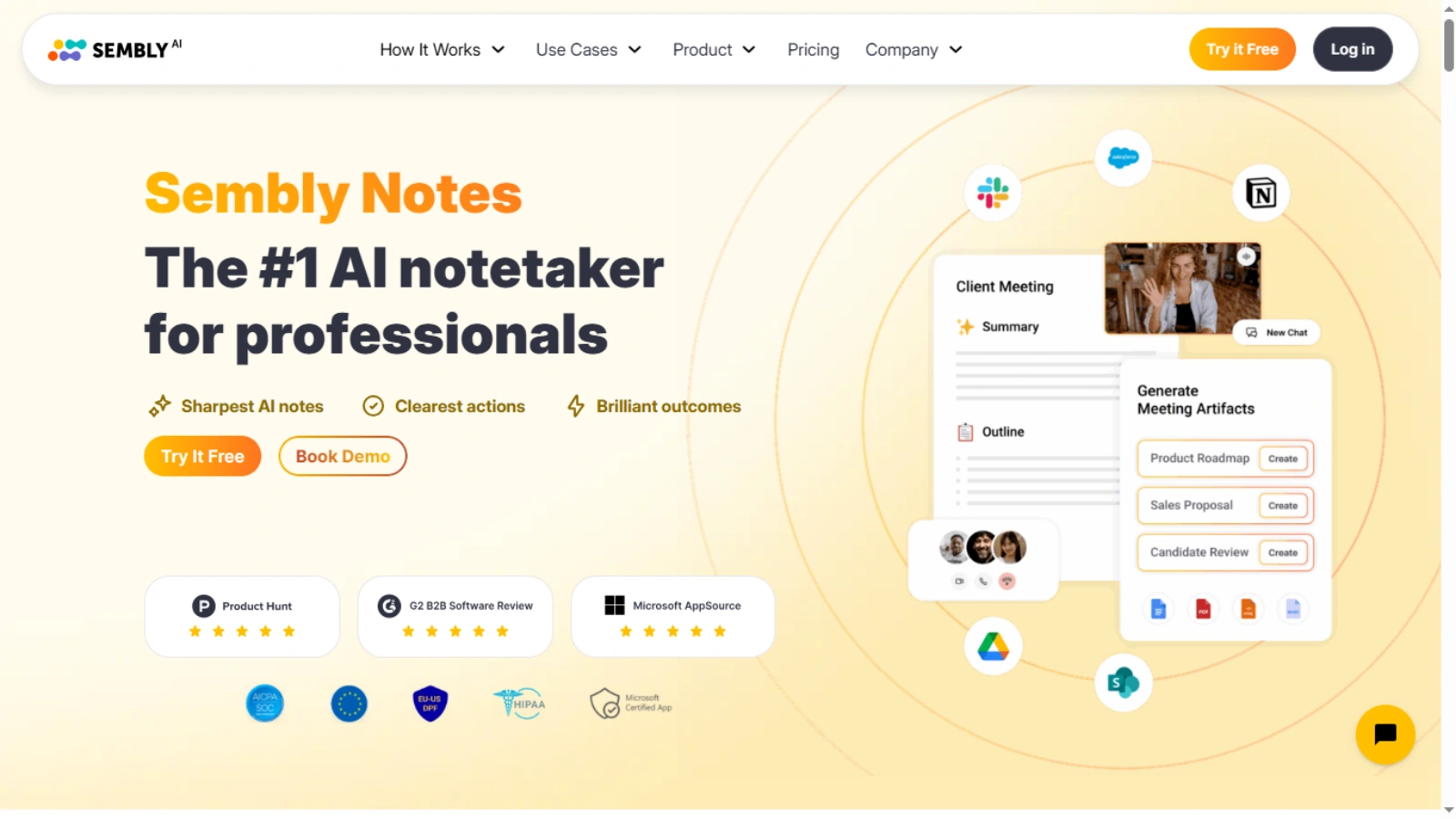
Sembly AI is a SaaS-based AI meeting assistant designed to help professionals and teams capture, understand, and act on meeting conversations.
Formerly known as Powow, Sembly uses proprietary AI algorithms to record meetings, generate transcripts, extract key insights, and create automated meeting summaries. It integrates seamlessly with popular platforms like Zoom, Google Meet, Microsoft Teams, and Webex, without requiring downloads.
Unlike basic transcription tools, Sembly focuses heavily on post-meeting intelligence, turning conversations into tasks, risks, requirements, and decisions that teams can actually use.
Who Is Sembly AI Best For?
Sembly AI is best suited for:
- Remote and hybrid teams running frequent meetings who need clear summaries, accountability, and actionable follow-ups without manual documentation.
- Managers and founders seek better ownership, decision tracking, and follow-through across recurring meetings and cross-functional discussions.
- Sales, marketing, HR, and customer success teams that depend on meeting insights to drive strategy, performance, and collaboration.
- Organizations that rely heavily on meetings for planning, alignment, decision-making, and long-term operational efficiency.
- Professionals who want to eliminate manual note-taking and focus fully on discussions while capturing structured outcomes automatically.
- Teams handling legal or compliance-critical meetings may still require human review for precise, word-for-word transcription accuracy.
It’s especially useful for teams that need structured meeting outcomes, not just transcripts.
However, users looking for perfect word-for-word accuracy in critical legal or compliance meetings may still need human review.
Key Features Of Sembly AI
Sembly AI stands out by focusing on what happens after meetings, not just during them. Its features are designed to capture conversations accurately, extract meaningful insights, and convert discussions into clear actions. From automated recording to intelligent analysis, Sembly AI helps teams stay organized, accountable, and productive without relying on manual note-taking.
1. AI Meeting Recording & Transcription
Sembly automatically joins scheduled meetings through calendar sync or meeting links and records them as a virtual participant. It then generates searchable transcripts with speaker recognition, allowing users to revisit any discussion later.
This feature is particularly helpful for:
- Team members who miss meetings
- Reviewing long or complex discussions
- Maintaining records for accountability
2. AI-Generated Meeting Summaries (GlanceView™)
GlanceView™ is one of Sembly AI’s most useful features, designed to save time and improve post-meeting clarity. Instead of reading through lengthy meeting transcripts, GlanceView™ automatically creates a concise, AI-generated summary that highlights the most important points.
This includes:
- Topics Discussed: A quick overview of all major discussion points, so you know what was covered without scanning the entire transcript.
- Key Decisions: Highlights the critical choices made during the meeting, ensuring accountability and follow-up.
- Important Highlights: Pulls out notable comments, action items, and insights that require attention.
By providing a clean, digestible snapshot of each meeting, GlanceView™ helps teams review discussions efficiently, track progress, and focus on actionable items instead of getting lost in endless notes.
3. Action Items, Risks, And Requirements Detection
Sembly goes beyond summarization by identifying:
- Action items
- Issues
- Risks
- Events
- Requirements
This is frequently praised in reviews, especially by users who dislike task tracking. Tasks can be pushed to other tools using webhooks and integrations, reducing manual follow-up work.
4. Cross-Meeting Search & Analytics
Sembly allows users to search across multiple meetings, making it easy to find past discussions, decisions, or commitments.
For managers, this becomes a powerful way to:
- Track recurring issues
- Identify patterns across meetings
- Monitor productivity and engagement
This cross-meeting intelligence is one of the platform’s strongest differentiators.
5. Workspace Collaboration & Access Control
Teams can collaborate within shared workspaces, manage permissions, and control access to meeting data. This makes Sembly suitable for both small teams and larger organizations that require structured collaboration and data governance.
6. Semblian 2.0 – Advanced AI Intelligence
With Sembly 2.0, Sembly introduces a more advanced AI layer that helps users:
- Generate reports, plans, and summaries across meetings
- Query conversations using natural language
- Turn meetings into business-ready insights
This feature is particularly appealing for leadership teams and managers.
What Users Like About Sembly AI
Based on verified reviews and community feedback, users consistently highlight the following strengths:
1. Saves Significant Time
Users consistently report major time savings by eliminating manual note-taking and repetitive follow-ups. This allows participants to stay fully engaged during meetings while Sembly automatically captures discussions, summaries, and action items in the background.
2. Easy Information Retrieval
The ability to search across transcripts, summaries, and multiple meetings is highly praised. Users can quickly find past decisions, commitments, or key discussions without scrolling through long recordings or relying on memory.
3. Actionable Insights
Sembly’s AI goes beyond transcription by identifying action items, risks, and requirements. This helps teams move smoothly from conversation to execution, improving accountability and ensuring important decisions don’t get lost after meetings.
4. Seamless Integrations
Users appreciate Sembly’s integrations with tools like Slack and its automation capabilities through webhooks. These integrations reduce manual work by pushing meeting outcomes directly into existing workflows and collaboration platforms.
5. Strong Value For Remote Teams
Remote and distributed teams find Sembly especially valuable for maintaining clarity and alignment. It helps bridge communication gaps by ensuring everyone has access to consistent meeting summaries, insights, and action items, regardless of location.
Overall, users view Sembly AI as a reliable productivity booster that transforms meetings into clear outcomes, helping teams save time, stay aligned, and execute faster.
What Could Be Improved?
While Sembly AI delivers strong value, no AI-powered tool is completely flawless. Based on user feedback and practical usage, there are a few areas where the platform could improve further.
1. AI Summaries May Need Occasional Review
Sembly’s AI-generated summaries are generally accurate and helpful, but in complex or fast-moving discussions, they can sometimes miss subtle context or intent. A quick human review helps ensure nothing critical is overlooked, especially for strategic or sensitive meetings.
2. Slight Learning Curve for New Users
Although the interface is clean, first-time users may need some time to fully understand where advanced features are located. Clearer onboarding prompts or guided walkthroughs could make the initial experience smoother.
3. Limited Native Task Management Integrations
While Sembly supports automation through webhooks, some users would prefer deeper native integrations with popular task tools like Trello or Asana. Adding these could further streamline post-meeting workflows.
Is Sembly AI Easy To Use?
Yes, for most users, Sembly AI is easy to use.
The platform features a clean interface and a straightforward onboarding process, making it accessible even for first-time users. Getting started does not require technical expertise, and setup takes only a few minutes.
Users can record meetings by:
- Inviting Sembly via email
- Adding a meeting link manually
- Syncing their calendar for automatic participation
Most users can start using Sembly AI effectively within a single day. While advanced features like cross-meeting analytics and Semblian 2.0 may take additional time to explore, the core functionality remains simple and intuitive.
What makes Sembly AI user-friendly:
- Minimal setup with no software installation
- Easy access to transcripts and summaries
- Clear navigation for reviewing past meetings
Overall, Sembly AI balances powerful features with ease of use, even for non-technical users.
Sembly AI Pricing – Is It Worth It?
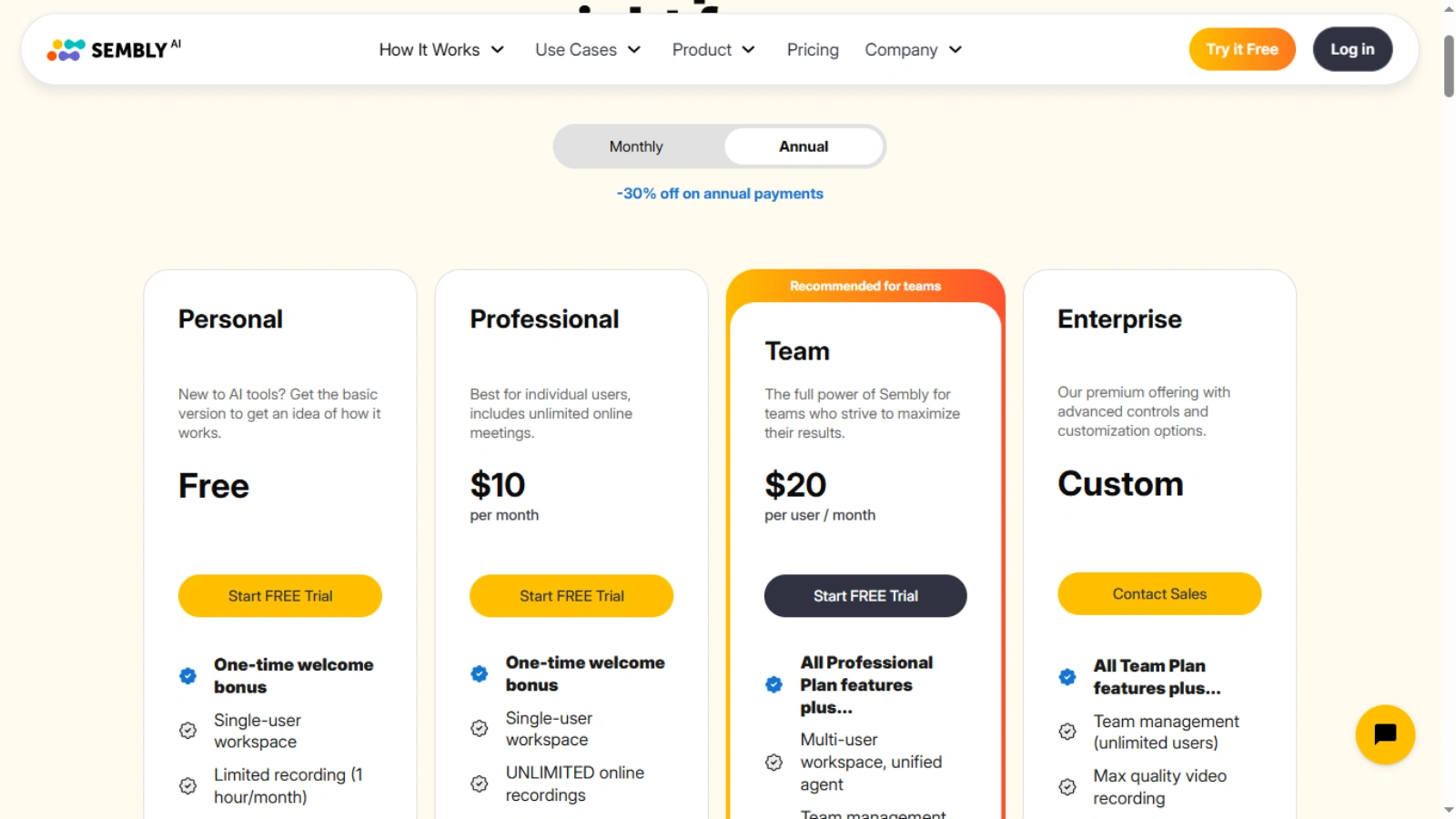
Sembly AI offers flexible pricing plans designed to suit both individuals and growing teams. The plans scale based on the level of AI intelligence and collaboration features required.
Sembly Personal – Free
Best for individuals who want to explore AI-powered meeting notes without any upfront cost.
Sembly Professional – $10/user/month
Ideal for professionals who need:
- AI-generated meeting summaries
- Automated meeting minutes
- Action item detection and tracking
Sembly Team – $20/user/month
Designed for teams that require:
- Advanced AI insights and analysis
- Workspace collaboration and access control
- Cross-meeting search and analytics
- Semblian 2.0 intelligence capabilities
Considering the time saved on note-taking and follow-ups, many users find Sembly AI highly cost-effective, especially at the team level.
Sembly AI Alternatives
If you are evaluating similar tools, here are a few notable alternatives:
- Fireflies.ai – Strong focus on transcription and searchable meeting notes.
- Otter.ai – Popular for live transcription and real-time note-taking.
- Microsoft 365 Copilot – Best suited for Microsoft-native workflows and applications.
- Notta AI – Offers AI-powered transcription, summaries, and multi-language support for meetings and recordings.
Compared to these tools, Sembly AI stands out for its action-oriented insights, cross-meeting intelligence, and AI-generated summaries that turn discussions into actionable outcomes, rather than just capturing transcripts.
Pros and Cons of Sembly AI
Before deciding if Sembly AI fits your workflow, it’s helpful to understand its key strengths and limitations. Here’s a concise overview of what users love and what could be improved.
Here are the Pros of Sembly AI:
- Improves communication and team alignment by automatically capturing and organizing meeting discussions.
- Supports multiple meetings, making it easier to manage recurring conversations and ongoing projects.
- Provides complete meeting transcripts, allowing users to revisit every detail when needed.
- Generates clear AI-powered summaries that simplify recaps and improve post-meeting follow-ups.
Cons of Sembly AI
- Being a newer platform, some features are still basic compared to more established tools.
- AI-generated summaries may occasionally miss nuance and benefit from manual review.
- Navigation can feel less intuitive for first-time users, resulting in a small learning curve.
Final Verdict:
Sembly AI delivers exactly what it promises: turning meetings into meaningful, actionable insights.
It’s not just another AI note-taker. The platform excels at post-meeting clarity, accountability, and decision tracking, making it especially valuable for remote teams, managers, and growing organizations.
While summaries may need occasional refinement, the overall productivity gains far outweigh the limitations.
If meetings are central to how your team works, Sembly AI is absolutely worth trying.
FAQs
- What is Sembly AI used for?
Sembly AI helps teams capture every meeting detail by recording, transcribing, summarizing, and analyzing discussions. It transforms conversations into actionable insights, improving productivity, follow-ups, and decision-making for all participants. - Does Sembly AI work without installing software?
Yes. Sembly AI can join meetings directly through calendar sync or meeting links. There’s no software installation required, making it easy to use across platforms like Zoom, Google Meet, and Microsoft Teams. - Can Sembly AI track action items automatically?
Absolutely. Sembly AI identifies action items, risks, requirements, and key decisions using AI-powered analysis. This automation helps teams follow up efficiently without manual note-taking or the risk of missed tasks. - Is Sembly AI good for remote teams?
Yes. Remote and hybrid teams benefit from Sembly AI’s ability to improve meeting clarity, accountability, and productivity. It ensures all discussions are captured, summarized, and transformed into actionable outcomes effectively. - Is there a free version of Sembly AI?
Yes. Sembly AI provides a free Personal plan ideal for individuals exploring AI-driven meeting notes. Users can record, summarize, and review meetings without any cost, with essential features included.