Color grading has always required a mix of technical skill and creative judgment. AI is changing the workflow by helping editors balance colors, match shots, and explore visual styles faster while keeping creative control in human hands. Modern AI-powered editing tools can handle repetitive adjustments, but professionals still guide the final look, mood, and storytelling choices.
Color grading is one of the final steps that turns a collection of shots into a connected visual story. But getting there often requires hours of balancing exposure, correcting color issues, matching different cameras, and testing creative looks.
For many editors, the challenge is not knowing what a good grade looks like. The challenge is reaching that look consistently across hundreds of clips while managing deadlines.
The growth of AI video editing is changing how editors approach this process. Instead of replacing the creative decisions behind a grade, AI tools are helping with time-consuming tasks like shot matching, color balancing, and applying references.
A recent report from Forbes article on artificial intelligence adoption highlights how businesses across industries are exploring AI to improve efficiency and automate repetitive workflows. Video production is following a similar path.
This article explains how AI is changing color grading workflows, where human expertise still matters, and how tools like the invideo editor are helping professionals combine automation with creative control.
The Role of AI in Modern Color Grading
AI is changing color grading by helping editors complete repetitive corrections faster while keeping creative decisions in their control. It can analyze footage, identify visual patterns, suggest adjustments, and help maintain consistency across multiple shots.
Traditional grading still depends on an editor’s eye. AI simply reduces the manual work involved in reaching the desired result.
Color grading involves two connected but different processes:
- Color correction: Fixing technical problems like exposure, white balance, and unwanted color casts.
- Color grading: Creating a visual style through contrast, color tone, and mood.
AI video editing tools can support both areas by recognizing differences between clips and helping editors create a consistent visual language.
For example, an interview recorded across different lighting conditions may need exposure balancing before the editor creates a warmer, more cinematic look. AI can help identify these differences and speed up the adjustment process.
The editor still decides whether the final video should feel dramatic, natural, nostalgic, or energetic.
Why does color correction take so much time?
Color correction takes time because every shot has different lighting conditions, camera settings, and color behavior. Editors often need to adjust clips individually before creating a consistent look across the entire project.
A typical correction process includes:
- Balancing brightness and exposure
- Fixing white balance problems
- Matching skin tones between shots
- Reducing unwanted color shifts
- Creating consistency between cameras
This becomes more complex in projects like documentaries, weddings, interviews, and multicamera productions.
A single event may include footage from several cameras with different sensors and settings. Even when the lighting stays the same, each camera can capture colors differently.
This is where AI video editing workflows can help. Instead of starting every correction from scratch, editors can use AI assistance to identify patterns and create a stronger starting point.
AI-assisted grading improves creative exploration
AI is not only helping with technical corrections. It is also changing how editors experiment with creative styles.
A filmmaker may want a scene to feel warm and emotional, cold and isolated, or high contrast and dramatic. Traditionally, achieving these looks requires manual adjustments across several controls.
AI tools can help editors test different approaches faster. They can analyze references, understand visual characteristics, and suggest changes that match a specific direction.
This does not remove the creative role of the editor. The final choice still depends on storytelling goals.
A documentary about a family event may need soft, natural colors. A product advertisement may require sharper contrast and stronger brand consistency. The same footage can communicate different emotions depending on the grade.
How do AI agents help editors with color grading tasks?
AI agents help editors by taking on repetitive editing tasks while allowing professionals to review and refine the results. They can assist with color matching, applying references, and preparing adjustments without removing timeline control.
This approach is different from simple automation. An AI agent can understand a broader editing instruction and complete multiple connected actions.
Invideo Editor follows this idea by combining AI editing agents with a professional timeline. Editors can provide direction, review the changes, and continue refining the project manually. The agents handle assigned work while the editor keeps control over the final edit.
In practical workflows, this matters because color work often happens alongside many other editing tasks. An editor may need to review footage, build sequences, clean audio, and prepare multiple versions at the same time.
An agentic workflow can reduce the amount of repetitive execution while leaving creative decisions with the editor.
Building a complete color workflow with AI and manual controls
Modern editors need both speed and precision. AI can help create a starting point, but detailed control remains important for professional finishing.
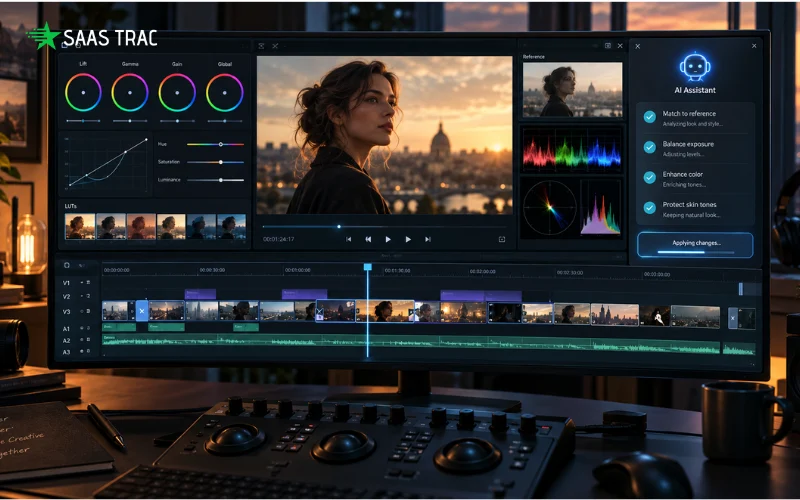
Invideo Editor includes tools that allow editors to correct exposure, balance colours, and create a specific visual style. Editors can describe the grade they want to AI agents or share a reference image, then refine the result using colour wheels, curves, and manual controls.
This type of workflow is useful when editors want both automation and control. The AI color grading features allow creators to guide the look of footage while keeping the ability to adjust details.
For example, an editor can share a reference image and tell the agent which shot should change. The system can interpret the reference’s color, warmth, and contrast to guide adjustments. The final result still depends on the original footage, lighting, and captured colors.
Editors can also target specific colors using hue, saturation, and luminance controls. These tools help adjust selected ranges instead of changing the entire image.
The workflow can include:
- Applying LUTs and adjusting their strength
- Refining contrast through curves
- Adjusting color intensity
- Making targeted corrections on specific shots
- Continuing manual adjustments after AI suggestions
This balance between AI assistance and human control is becoming an important part of modern video production workflows.
The role of human creativity in AI video editing
AI can speed up technical processes, but creative judgment remains central to color work.
A colorist is not only fixing problems. They are making decisions about how viewers experience a story.
For example:
- A thriller may use darker shadows and cooler tones.
- A travel video may use brighter colors and natural contrast.
- A documentary may require realistic skin tones and balanced exposure.
These decisions require context. AI can recognize patterns, but the editor understands the purpose behind the video.
Invideo Editor is designed around this balance. It allows creators and editors to assign work to AI agents while keeping the project editable and visible. The timeline remains available for manual refinement, so editors can adjust decisions when needed.
This approach is especially useful for professionals handling large projects where time is limited, but quality standards remain high.
What’s Next for AI-Assisted Color Grading
The future of AI video editing will likely focus on collaboration between human editors and intelligent tools. Instead of replacing creative roles, AI will continue helping professionals manage complex workflows.
Future workflows may include:
- Faster shot matching between cameras
- More accurate reference-based grading
- Better understanding of storytelling intent
- Automated preparation of multiple versions
- Improved collaboration between teams
The biggest change is that editors may spend less time performing repetitive adjustments and more time shaping the creative direction of a project.
AI becomes another part of the editing process, similar to other tools professionals already use.
Conclusion
AI is changing color grading workflows by making technical adjustments faster while giving editors more room to focus on creative choices. Color correction, shot matching, and style exploration can become more efficient when AI handles repetitive steps.
The future of AI video editing is not about removing human creativity. It is about helping editors spend more time on storytelling and less time on repetitive tasks.
Tools like invideo editor show how AI agents can support professional workflows by working inside an editable timeline while keeping creators in control. As AI continues to improve, editors will have more ways to combine speed, precision, and creative vision.
Frequently Asked Questions
Can AI completely replace professional color grading?
No. AI can assist with technical corrections and workflow improvements, but professional color grading still depends on creative decisions. Editors choose the mood, tone, and visual style based on the story they want to tell.
What is the difference between AI color correction and AI color grading?
AI color correction focuses on fixing technical issues like exposure, white balance, and unwanted color casts. AI color grading focuses on creating a visual style through color, contrast, and tone adjustments.
How does AI help with matching colors between shots?
AI can analyze differences between clips and help create consistent adjustments across a sequence. This is useful when footage comes from multiple cameras or changing lighting conditions.
Can editors still manually adjust AI-generated grades?
Yes. AI-assisted workflows usually allow editors to refine results manually. Invideo Editor provides color controls like wheels, curves, and other adjustments for further editing.
Why are AI agents useful in professional editing workflows?
AI agents can handle repetitive tasks like reviewing footage, applying adjustments, and preparing edits while editors focus on creative decisions. Invideo Editor uses AI agents that work on assigned tasks while keeping changes visible on an editable timeline.