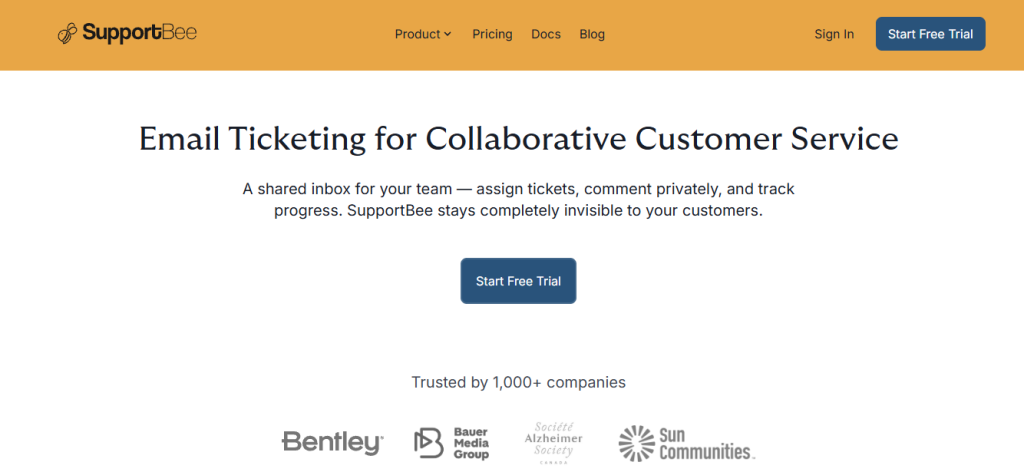
You’ve probably landed here because your team is drowning in a shared Gmail or Outlook inbox tickets get missed, two agents reply to the same customer, nobody knows who owns what, and adding a second person to the inbox makes things worse rather than better. That’s exactly the gap SupportBee is built to close. Its core pitch is deceptively simple: a ticketing system that works like email no learning curve, no training required, no IT department needed but with the collaboration tools (assignment, private commenting, draft reviews, filters, audit trails) that a shared inbox fundamentally cannot provide. Whether that simplicity is a strength or a limitation depends on how complex your support workflows are and whether you need the heavier automation and AI features that enterprise help desks carry.
🔗 Start Your 14-Day Free Trial No Credit Card Required → https://try.supportbee.com/yson4stfq9v7
Why Trust SaaSTrac?
This review is built from SupportBee’s own product pages, pricing page (verified July 2026), feature documentation, and integrations listing, plus independent reviews from Capterra (July 2026), GetApp, Findstack, SoftwareSuggest (July 2026), SoftwareFinder, BestTicketingSystemSoftware, SlashDot, and Which-50 (August 2026). Pricing figures are taken directly from the live SupportBee pricing page Startup at $17/seat/month (annual) or $20/seat/month (monthly) and Enterprise at $21/seat/month (annual) or $25/seat/month (monthly) and confirmed against multiple independent sources. Always confirm current pricing and feature availability directly on supportbee.com/pricing before purchasing.
What SupportBee Is
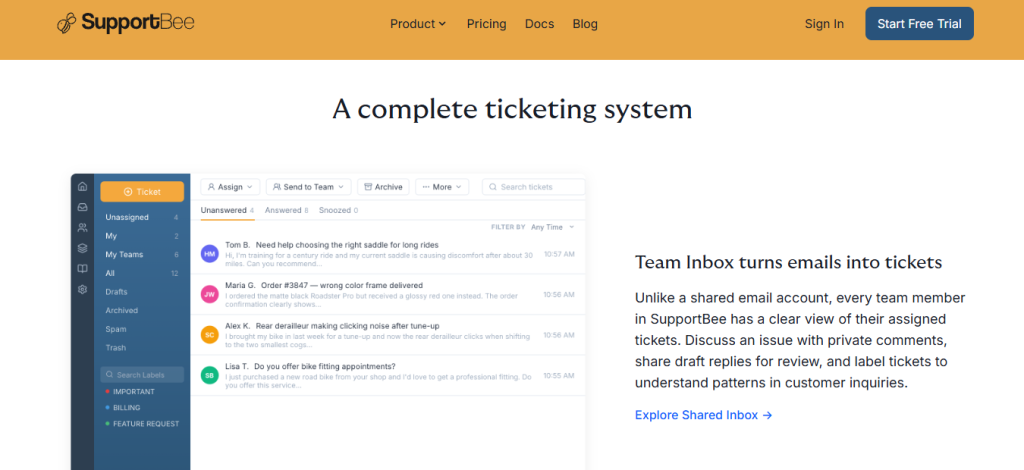
SupportBee is a cloud-based customer support ticketing platform built around one central idea: a shared inbox that works like email but with the collaboration infrastructure that email structurally cannot provide. Founded and continuously developed as a focused alternative to heavyweight help desk platforms, SupportBee converts every incoming customer email into a ticket that can be assigned to a specific agent or team, discussed privately with internal comments, drafted collaboratively before sending, and tracked through its full lifecycle with a complete audit trail while remaining completely invisible to the customer, who simply receives normal email replies throughout.
The platform serves 1,000+ companies worldwide including Bentley Systems, BMG, Alzheimer Society of Canada, Arizona State University, Sun Communities, and Corsearch spanning nonprofit, enterprise, education, and commercial sectors. It is designed specifically for small to mid-sized business support teams that want to move away from a messy shared email inbox without the months-long implementation, per-agent pricing complexity, and feature overhead of platforms like Zendesk or Salesforce Service Cloud. Setup is measured in minutes, not days connect your email, add your team, and start working through tickets immediately.
What You Get (and What You Don’t)
Feature | What’s Included | Limitations |
Shared Team Inbox | Converts incoming customer emails into organized tickets; each team member sees their assigned tickets clearly; Gmail-compatible keyboard shortcuts; real-time updates; completely invisible to customers they always see normal email | Single-channel email focus; does not natively handle live chat, social media, or phone tickets without third-party integration |
Ticket Assignment | Assign tickets to individual agents or teams; reassign as ownership changes; clear accountability for every open ticket | Multiple-team support (3 teams) available on Enterprise plan only; Startup plan includes 1 team |
Private Comments and Internal Notes | Add private comments visible only to your team discuss context, escalation notes, and background without the customer seeing any internal conversation | Private commenting is internal-only; does not support structured escalation workflows or SLA-triggered routing without integration |
Draft Sharing and Peer Review | Share reply drafts with teammates for review and approval before sending eliminates the risk of unreviewed responses going to customers | Draft review is a manual collaborative process; does not enforce mandatory approval workflows |
Snippets (Canned Responses) | Save and reuse common reply templates for frequently asked questions send accurate, consistent responses without rewriting from scratch | Snippets are static templates; does not include AI-powered response suggestions |
Filters and Automated Routing | Set up rules to automatically route, label, and assign incoming tickets based on conditions (sender, subject, keywords) | Filter logic is straightforward rather than complex multi-step; advanced workflow automation requires Zapier or third-party integration |
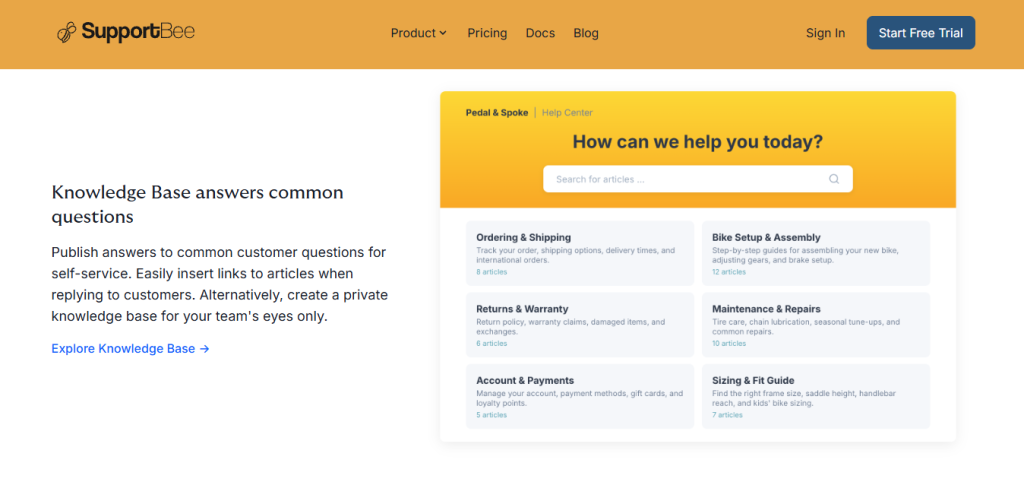
Knowledge Base (KBee) | Create and publish a public self-service knowledge base for customers; create a private knowledge base for internal team reference; insert article links directly when replying to tickets | 1 knowledge base included on Startup plan; Enterprise supports multiple knowledge bases |
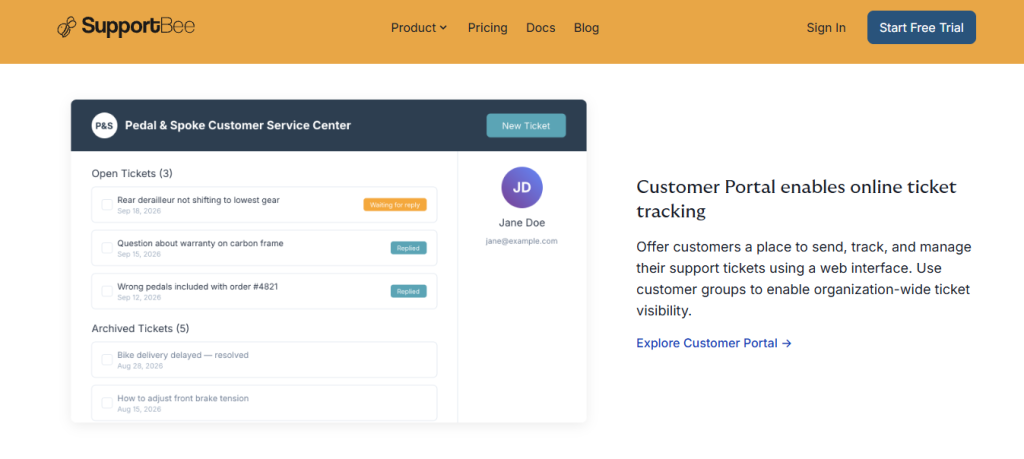
Customer Portal | Give customers a web interface to submit, track, and manage their tickets; use customer groups for organization-wide ticket visibility (Enterprise) | Customer Portal is an Enterprise plan feature only not available on Startup |
Customer Satisfaction Ratings (CSAT) | Collect customer feedback on resolved tickets to track support quality and agent performance | CSAT ratings are included on both plans; in-depth reporting available on both tiers |
Audit Trail | Every action on every ticket is logged who did what and when providing full accountability and traceability | Audit log and extended data history is a more detailed Enterprise feature; basic audit trail available on Startup |
Performance Reports | Agent, team, and label performance reports identify bottlenecks; customer satisfaction data tracks support quality over time | Reporting covers core metrics well; does not include advanced BI-style dashboards or custom report builders |
Integrations | 20+ integrations including Slack, GitHub, Jira, Trello, Asana, ClickUp, Basecamp, Teamwork, Pipedrive, Zoho CRM, Zapier, Wufoo, Customer.io, and more; API access on all paid plans | Basic integrations on Startup; Enterprise integrations (expanded set) on Enterprise plan only; verify which specific integrations are available per plan on supportbee.com |
Customer Management | Track all previous interactions with each customer in one view; full interaction history preserved across tickets | Customer management is included on both plans; does not include CRM-level customer health scoring or lifecycle tracking without integration |
Mobile and Desktop Access | Accessible on desktop browsers, mobile devices, and via email notifications; teams can collaborate in whichever way works best | No dedicated native mobile app listed; mobile access is via responsive web interface |
The takeaway: SupportBee goes deep on one specific outcome email-based ticket management with collaborative tools that feel like email but work like a proper help desk rather than trying to match every feature on the Zendesk or Freshdesk spec sheet. The platform’s emphasis on simplicity and rapid setup is its clearest competitive advantage for small to mid-sized teams. The natural limitation that comes with that focus is that teams needing built-in live chat, social media ticketing, complex multi-step automation, or AI-powered response generation will need integrations or a different platform to cover those gaps.
Pricing: What You Actually Pay
SupportBee uses a clean two-plan model Startup and Enterprise billed per seat with a 20% discount for annual billing. No credit card is required for the 14-day free trial. Cancel anytime; data can be exported via the API.
Plan | Monthly Billing | Annual Billing | What’s Included |
Startup | $20/seat/month | 17/seat/month(204/seat/year) | Shared Inbox; Snippets; Filters; 1 Knowledge Base; 1 Team; Basic Integrations; API Access; Unlimited Email Inboxes and Tickets; Customer Satisfaction Ratings; Customer Management; Audit Trails; Friendly Customer Service |
Enterprise | $25/seat/month | 21/seat/month(252/seat/year) | Everything in Startup; 3 Teams; Enterprise Integrations; Business Hours; Customer Portal Software; Audit Log and Data History; Portal Access for Customer Groups |
Real-world cost context: For a 5-agent team on the Startup plan, annual billing works out to 1,020/year(85/month) significantly lower than comparable plans on Freshdesk (288/monthfor5agentsonGrowth),Zendesk(875/month for 5 agents on Suite Team), or Help Scout ($200/month for 5 users on Standard). SupportBee’s per-seat pricing with unlimited tickets rather than per-ticket or tiered-volume pricing means cost is entirely predictable as ticket volume grows. The only variable is headcount.
Worth checking before you subscribe: the 14-day free trial covers all features with no credit card, which is the right starting point the platform’s core value (shared inbox, assignment, private comments, snippets, filters) is entirely evaluable in that window. The key plan decision is whether your team needs the Customer Portal and Enterprise integrations (Jira, more CRM connections) if yes, start on Enterprise. If your primary need is shared inbox collaboration and a knowledge base, Startup covers the core workflow completely.
Email-Native Simplicity vs. Feature-Heavy Help Desks: The Core Trade-Off
SupportBee’s core argument is that a ticketing system that mirrors email workflows no learning curve, no configuration overhead, no IT involvement gets teams from messy shared inbox to organized collaborative support faster and at lower cost than platforms that require weeks of setup before delivering value. User reviews on Capterra (July 2026) and GetApp consistently validate this: “It gives a great overview of open tickets and allows us to set owners to each ticket before we had SupportBee it was very messy”; “It has made it so much easier to handle our customer support and organise it by priority levels.” The trade-off reviewers flag is two-sided: SupportBee’s deliberate simplicity means it does not try to do everything, and teams needing built-in AI responses, complex conditional automation, live chat, or social media ticket management will either need to integrate those capabilities via Zapier or a third-party connector, or consider a more feature-dense platform. Capterra also notes that new feature development moves more slowly than at larger vendors though user comments consistently acknowledge that the SupportBee team is responsive to specific requirements.
Who SupportBee Is Built For
SupportBee’s practical value depends on how closely your support workflow maps to email-based ticket management:
- Small to mid-sized business support teams who currently run customer support through a shared Gmail or Outlook inbox and need the collaboration structure (assignment, private notes, audit trails) that email can’t provide, without a months-long enterprise help desk implementation.
- Teams prioritizing speed of setup and adoption who have tried heavier ticketing systems and found that agent onboarding, configuration complexity, and maintenance overhead consumed more time than the tool saved; SupportBee’s five-minute setup and email-familiar interface eliminates that friction.
- Organizations supporting customers via email as the primary channel including nonprofits, educational institutions, professional services firms, and B2B software companies whose customers expect normal email replies rather than ticket portal notifications.
- Support teams managing tickets across multiple departments or brands who need to route tickets to different teams (Startup: 1 team; Enterprise: 3 teams) and want clear ownership and labeling without building a complex workflow engine.
- Teams requiring customer self-service without engineering resources who want to publish a knowledge base and offer customers a portal to track their tickets, without setting up a separate self-service platform or involving a developer.
- Cost-conscious growing businesses who need predictable per-seat pricing with unlimited tickets, rather than platforms that charge by ticket volume, automation runs, or feature tier in ways that create unpredictable monthly bills as support scales.
What Are the Downsides of Using SupportBee?
- Customer Portal is Enterprise-only. The ability to offer customers a branded web interface to submit and track their own tickets is locked to the Enterprise plan (21–25/seat/month). Teams evaluating Startup who expect to offer a customer portal will need to upgrade factor this into plan selection from the start.
- Single team on the Startup plan. The Startup plan includes only one team, which limits the ability to route tickets across departments (Sales, Support, Technical, Billing) without upgrading to Enterprise (3 teams). Larger organizations or those with multi-department support workflows will hit this ceiling relatively quickly.
- No built-in AI or advanced automation. SupportBee does not include AI-powered response suggestions, intelligent ticket classification, or complex multi-step conditional workflow automation out of the box. Teams that want those capabilities need to implement them through Zapier integrations or third-party connectors which works, but adds setup and cost.
- New feature development moves slowly. Multiple Capterra reviewers note that SupportBee’s feature roadmap progresses more slowly than larger competitors. The platform is stable and reliable, but teams expecting rapid new feature releases or a modern AI-first feature set should calibrate expectations accordingly.
- Email-first channel coverage. SupportBee is purpose-built for email-based support. Teams that need native live chat, social media (Twitter/X, Facebook) ticketing, or voice channel integration within the same platform will need to supplement with dedicated tools or integrations the platform does not natively cover those channels.
SupportBee vs. Freshdesk, Help Scout, or Zendesk: Where Each One Wins
Category | SupportBee | Freshdesk | Help Scout | Zendesk |
Best for | Email-native ticket management for small to mid-sized teams; fastest setup; lowest cost at equivalent scale | Multi-channel support (email, chat, social, phone) with automation and AI for growing teams | Email and chat support for teams that want customer-first simplicity with polished UI; strong for B2C | Enterprise-grade multi-channel support with advanced automation, AI, and reporting at scale |
Starting price | $17/seat/month (annual); 14-day free trial | Free plan available; paid from $15/agent/month (Growth, annual) | From $20/user/month (Standard); free trial | From $55/agent/month (Suite Team) |
Setup time | Under 5 minutes | Hours to days depending on configuration | Minutes | Days to weeks depending on plan |
Learning curve | Very low mirrors email workflow | Low to moderate | Low | Moderate to high |
AI features | ✗ (requires integration) | ✓ Freddy AI on paid tiers | Limited | ✓ Advanced AI on higher tiers |
Live chat | ✗ | ✓ | ✓ | ✓ |
Social media ticketing | ✗ | ✓ | ✗ | ✓ |
Customer portal | ✓ Enterprise plan | ✓ | ✗ (help center) | ✓ |
Knowledge base | ✓ Both plans | ✓ | ✓ | ✓ |
Unlimited tickets | ✓ Both plans | ✓ | ✓ | ✓ |
Pricing model | Per seat; unlimited tickets | Per agent; tiered by features | Per user | Per agent; tiered by features |
Invisible to customer | ✓ Always replies as normal email | Partial (portal notifications available) | ✓ | Partial |
Trusted by | Bentley Systems, BMG, Arizona State University, Alzheimer Society of Canada | 60,000+ businesses | 12,000+ businesses | 100,000+ businesses |
Neither wins outright for every team. If your support workflow extends beyond email to live chat, social media, and voice and you need native AI at scale Freshdesk or Zendesk provide those capabilities at higher cost and complexity. If you want the most polished modern UI for email and chat with a customer-centric design focus, Help Scout is the strongest competitor in the mid-market. If your primary need is collaborative email ticket management that sets up in minutes, costs less than any comparable alternative, and stays completely invisible to customers SupportBee is the strongest option in its category.
Is SupportBee Worth It?
Likely worth it if:
- Your team currently manages customer support through a shared Gmail or Outlook inbox and needs assignment, private commenting, and accountability without the complexity of an enterprise help desk
- You need to be up and running today SupportBee’s five-minute setup and email-familiar interface means agents can start working through tickets without training or configuration overhead
- You want predictable, per-seat pricing with unlimited tickets that doesn’t create billing surprises as support volume grows the cost is entirely determined by headcount
- You support customers primarily via email and want your replies to always arrive as normal email, with no ticket portal notifications that break the personal feel of customer communication
- You want a knowledge base and (on Enterprise) a customer portal without building or maintaining separate self-service infrastructure
- You want to evaluate the full platform with a 14-day free trial before entering a card the trial is genuine and includes all core features
Probably not the right fit if:
- Your support team handles customer inquiries via live chat, social media, or phone and needs those channels natively integrated into the same ticketing system SupportBee’s email-first architecture doesn’t cover those channels without external tools
- You need AI-powered response suggestions, intelligent ticket routing, or complex multi-step conditional automation built into the platform without additional configuration those capabilities require integration rather than being native
- You are on the Startup plan but expect to offer customers a branded self-service portal the Customer Portal is an Enterprise feature and will require upgrading
- Your organization supports more than three internal teams or departments routing tickets through a single account Enterprise supports 3 teams, which is the platform’s structural ceiling without custom arrangement
- You are evaluating primarily on the strength of a modern AI-first feature roadmap SupportBee’s development pace is slower than larger competitors, and AI features are not currently part of the native platform
SupportBee is a well-regarded, honestly positioned email ticketing platform that does exactly what it says on the label collaborative customer support that works like email, sets up in five minutes, and costs a fraction of the major help desk platforms. The 1,000+ customer base including Bentley Systems, Arizona State University, and BMG demonstrates that its focused feature set scales beyond early-stage businesses into established organizations with real support volume. The trade-offs are clear and worth stating plainly: no native live chat, no AI, a single team on Startup, and a slower feature roadmap than larger competitors. For small to mid-sized teams that want to move from a chaotic shared inbox to organized collaborative ticket management today without a platform migration project SupportBee is the most practical starting point available at this price.
SupportBee Pros:
- Sets up in under 5 minutes connect email, add team, start working; no IT department, no configuration project, no agent training required
- Completely invisible to customers all replies arrive as normal email; no ticket portal notifications, no branded ticket numbers in subject lines, no break in the personal feel of customer communication
- Per-seat pricing with unlimited email inboxes and tickets cost is entirely predictable and determined by headcount, not ticket volume or feature tier
- Private commenting and draft sharing let multiple agents collaborate on a single ticket without the customer seeing any internal discussion
- 14-day free trial with no credit card required genuine evaluation of all core features before any commitment
- Trusted by 1,000+ companies including Bentley Systems, BMG, Alzheimer Society of Canada, and Arizona State University
- Integrates with 20+ tools including Slack, GitHub, Jira, Trello, Asana, ClickUp, Pipedrive, Zoho CRM, and Zapier
- Audit trail logs every action on every ticket full accountability and traceability across the team
- Annual billing discount of 20% on both plans; cancel anytime with full data export via API
SupportBee Cons:
- Customer Portal is Enterprise plan only teams on Startup who want to offer customers a self-service ticket tracking interface will need to upgrade
- Startup plan limited to 1 team multi-department routing requires the Enterprise plan (3 teams); complex multi-team organizations may find this limiting
- No native AI features or advanced conditional workflow automation teams needing intelligent response suggestions or complex automation rules require Zapier or third-party connectors
- Email-only native channel coverage live chat, social media, and voice ticketing require external tools or integrations
- Feature development roadmap moves more slowly than larger help desk competitors the platform is stable but not on an aggressive AI-first innovation cycle
 Email ticketing that works like email
FAQs
For small to mid-sized teams managing customer support through a shared email inbox and needing collaborative ticket management without the complexity or cost of enterprise help desk platforms, user reviews and the platform’s customer base consistently say yes.
The Startup plan is $20/seat/month on monthly billing or 17/seat/monthonannualbilling(204/seat/year). The Enterprise plan is $25/seat/month (monthly) or $21/seat/month (annual, $252/seat/year). Annual billing saves 20% on both plans. There is no free plan, but a 14-day free trial requires no credit card. Always confirm current pricing on supportbee.com/pricing before purchasing.
Both plans include the shared inbox, snippets, filters, knowledge base, API access, unlimited tickets, customer satisfaction ratings, and audit trails. The Enterprise plan adds three teams (vs. one on Startup), Enterprise integrations, business hours settings, the Customer Portal for customers to track their own tickets, extended audit log and data history, and portal access for customer groups. If your team needs a customer-facing ticket portal, the Enterprise plan is required.
Yes. SupportBee is designed to remain completely invisible to customers throughout every interaction. Customers send and receive normal emails they never see ticket numbers in subject lines, portal login prompts, or any indication that a help desk platform is involved. This preserves the personal nature of email communication while giving your team full internal ticket management infrastructure.
Freshdesk (for multi-channel support covering email, chat, social media, and phone with AI features at a comparable price point), Help Scout (for teams wanting a polished modern UI for email and chat support with a strong customer-centric design philosophy), and Zendesk (for enterprise-scale multi-channel support with advanced automation and AI at higher cost) are the most commonly cited alternatives depending on whether you need additional channel coverage, a more modern interface, or enterprise-grade automation at larger scale.